Storage and Layout Choices That Reduce Clutter
Storage and Layout Choices That Reduce Clutter
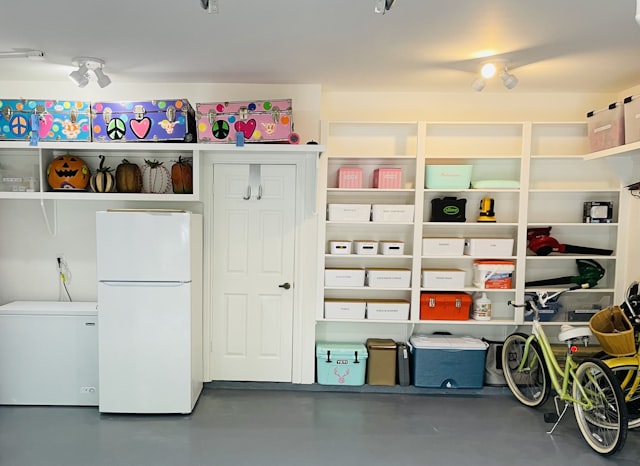
Practical guidance on storage and layout choices that cut clutter across smart homes and small business systems.
Storage and Layout Choices That Reduce Clutter
Clutter is not just about owning too much. More often, it happens when storage is treated as decoration instead of part of the system. In homes that mix work, family routines, and smart devices, mess usually builds up where the handoff is weakest: entry points, charging areas, shared drawers, and shelves everyone uses but nobody owns.
That is where rushed setups and vague organizing advice cause trouble later. A bin that looks neat on day one can fail by week three if nobody knows where cables go, what gets labeled, or how a space gets reset after use. The result is not only visual mess but also delays, missed items, and small frustrations that slow the day.
The same pattern shows up in small business settings and home offices. A desk can look organized and still slow work if supplies, devices, and documents are stored where people must interrupt their workflow to reach them. Good layout removes those interruptions before they become habits.
Clutter becomes expensive when it slows decisions
A room does not need to be packed to feel overloaded. A few bad decisions in the wrong places are enough. That is why storage and layout matter more than decorative organization. They affect how quickly people put things away, whether devices stay charged, and whether a space still works when routines change.
In business terms, clutter creates process problems. In home terms, it creates accountability problems. Nobody can maintain what they cannot see, and nobody can keep a shared system clean when the storage is too deep, too vague, or too far from the point of use. The cost starts small, then grows when the system fails during a busy morning or a missed handoff.
There is also a hidden time cost. Every extra search, duplicate purchase, and delay in finding the right cable or document adds friction. Over time, that friction becomes a habit. Storage that supports fast decisions saves more time than storage that simply holds more things.
- A good layout reduces backtracking.
- Visible storage tends to get used correctly.
- Overbuilt systems often fail because they require too much upkeep.
Three judgments that separate useful storage from busy-looking storage
Good storage choices are not about fitting in more containers. They are about reducing the number of decisions needed in daily use.
The best systems are simple enough to work on a tired day without overthinking. The question is not whether a setup looks tidy in a photo. It is whether it still works when the room is busy, the battery is low, or a task is handed off to someone else. At that point, many teams begin comparing home organization habits based on how they actually perform day to day.
Put storage where the action happens:
If the charger is upstairs, the tools belong upstairs. If mail is sorted near the door, paperwork should stop there first. Distance creates drift because people skip systems that ask for extra steps, and the room starts absorbing whatever was meant for another place. The best layout often looks plain because it is built around convenience, not display.
This also matters for shared work zones. Frequently used supplies should be reachable without moving other items first. If someone has to clear a surface before they can use it, that surface will stop functioning as intended.
Use shallow access before deep capacity:
Deep cabinets and oversized bins look efficient, but they hide oversight. When items disappear behind other items, people stop noticing what is missing until it turns into a delay. Shallow drawers, open shelves, and narrow zones are less glamorous, but they keep the system honest.
This approach also makes maintenance easier. If a container can be checked in seconds, people will check it. If it requires sorting and lifting just to confirm what is there, the check gets postponed. That is how clutter survives even in well-designed rooms.
Do not organize around the ideal user:
One common mistake is designing for the person with the best memory or the most patience. Real households and mixed-use spaces are run by whoever is tired, busy, or already late. If the system only works when everyone follows a perfect sequence, it will break.
A better test is whether the layout still makes sense after a week of imperfect use. If not, the system needs fewer steps, fewer categories, or a more obvious landing place for items that do not yet have a permanent home.
Simple changes that reduce clutter without adding upkeep
The goal is not to overhaul everything at once. Start with the spaces that create the most friction and make those easier to maintain. This is usually where buyers start looking at smart home articles more carefully in real-world conditions.
Small changes work best when they are specific. The most useful fixes are usually structural rather than decorative, because they change behavior without constant reminders.
- Map the daily path from entry to storage to use, and note the items that get dropped, stacked, or left charging in the wrong place.
- Match each item group to one container or zone, then remove excess choice. If a drawer holds five unrelated categories, it will drift fast.
- Keep one reset point in every shared area. A tray, shelf, or basket can hold the things that need attention before they become a bigger problem.
- Audit one problem area for duplicates and dead space. Extra chargers, unused organizers, and half-filled bins make a space harder to read.
- Standardize the most common items first so the tools, cables, or documents used most often have the clearest home.
- Review the setup after a busy week, not a quiet afternoon. Real use exposes the weak points and shows where the layout needs to change.
The best systems survive messy weeks
A useful layout does not depend on motivation. It survives the week when schedules change, guests arrive, or work spills across the house. That is why practical technology adoption matters here too. Smart plugs, charging stations, sensors, and automated reminders help only when the physical storage plan supports them.
In that sense, storage is part of the technology stack. It determines whether devices can be charged, found, and reset without friction. It also shapes whether reminders actually lead to action. If a notification says something needs attention but the item is buried in a drawer, the system has already lost momentum.
The rooms that stay clear are usually not the ones with the most storage. They are the ones with the least confusion. People know where things go, who owns the reset, and what gets ignored until the next cycle. That kind of quiet accountability is more durable than a perfectly styled shelf.
This is where business systems and smart home organization overlap. Both depend on repeatable behavior, low-friction access, and clear ownership. Whether the space is a home office, an entry hall, or a shared back room, the goal is the same: reduce the number of decisions needed to keep things working.
Less clutter starts with fewer decisions
Storage and layout choices reduce clutter when they make the next action obvious. That may mean moving a shelf, shrinking a bin, or admitting that a neat-looking setup is creating extra work. The better system is often less flexible on paper, but more forgiving in real use.
For homes that mix practical technology and daily routines, that judgment matters. A room can look organized and still fail its job. The spaces that hold up are the ones designed for real hands, real timing, and the occasional oversight. Keep the setup simple enough that it does not need rescuing every week, and it will usually take care of itself.